New Feature Release: ABS AI Assistant (Artificial Intelligence)
ABS AI Assistant is like having an ABS expert at your desk, ready to help you with any questions you may have.
Introduction
ABS AI Assistant is a revolutionary addition to ABS Agency Builder. Its sole purpose is to provide you with instant access to expert knowledge and guidance that will help you use ABS Agency Builder without the downtime of calling tech support, or searching through documentation. However, after a few months of monitoring its use, we know that only a few offices have taken advantage of the benefits AI can provide.
We encourage everyone to take advantage of the power of AI and see the difference it can make in your daily workflow. Here's an example of the time savings it can provide:
Shortly after the release of our AI Assistant we received an email from a user asking how to add a new insurance carrier to the carrier list. Before we could respond, the user had already found the solution using the AI Assistant. How do we know? While crafting a response, we received another email saying they had found the answer on their own using the AI Assistant!
ABS AI Assistant Overview
ABS AI Assistant was added to ABS Agency Builder beginning with release 3.33.103. It uses true Artificial Intelligence designed to make your daily work easier by helping you quickly find answers, guidance, and technical support directly from within ABS Agency Builder. You can simply ask questions in plain language about any aspect of using ABS Agency Builder, and the AI Assistant will guide you to the right features, steps, or processes.
Easy to Use
To open AI Assistant, click the AI Assistant icon in the toolbar.

Enter questions at the bottom of the window. Press Enter, or click the circled up-arrow when done. If you prefer, you can also use voice input to dictate your questions.
The question will be shown in the gray panel on the right. The answer is shown below it in the white panel on the left. Here is an example.
Sample AI Assistant
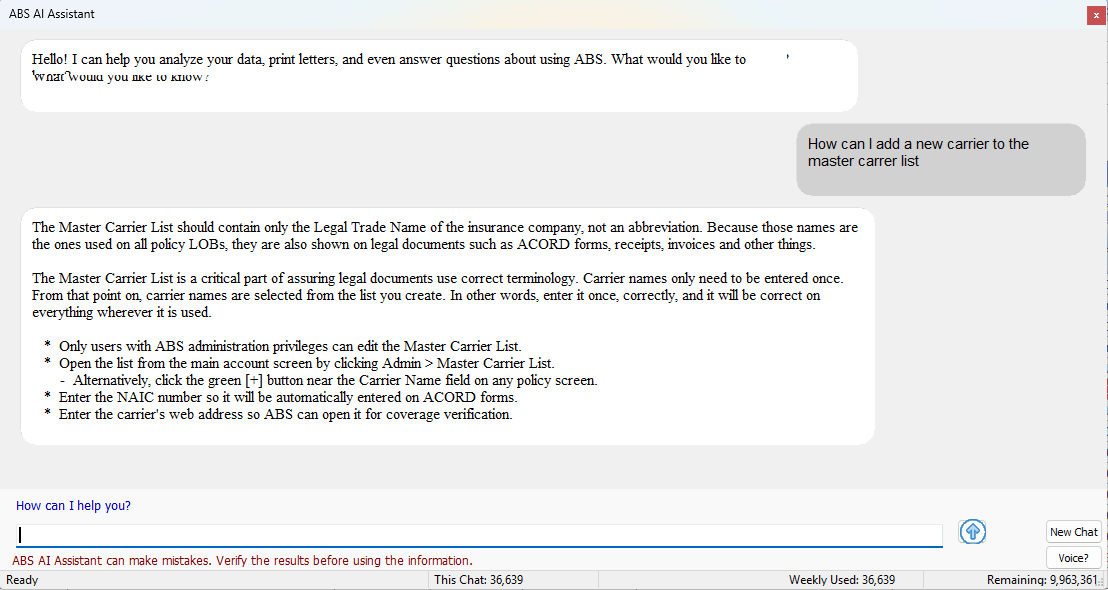
Step-by-Step Guide
The AI Assistant layout is like other popular AI services such as ChatGPT, Gemini, or ClaudeAI. This similarity should shorten the learning curve for users already familiar with AI. The main difference is that our AI has been trained to limit its responses to ABS software.
- Enter your question at the bottom and press Enter, or click the up-arrow button. Make your question as complete and clear as possible. Vague questions make it hard for AI to know how to respond.
- As soon as your question is submitted it is moved to the gray, right-aligned window (the question bubble).
- The ABS AI Assistant may think for a moment before displaying the answer in the white, left-aligned window (the answer bubble).
- Depending on the clarity and subject of your question, AI Assistant may give you an abbreviated list of possible answers. They will be shown as Options (i.e. ** Option 1 **). Select the option you want by entering its number at the bottom
- If your environment is reasonably quiet, and free from nearby conversations, you can click the Voice? button, and dictate your question. Dictation is only available on newer versions of WindowsTM. Dictation success depends on your environment.
- You can ask natural language questions about
- Creating a client letter (i.e.Create a cancellation for non-payment letter.)
Note, if you want AI to write a custom letter from scratch, say "Draft a letter saying..." - How to perform certain operations (i.e. How do I schedule unattended backups?)
- Accessing reports or queries (i.e. Give me a list of fire policies without flood coverage.)
- Technical support (i.e. How do I reset my password? or How do I add a new workstation?)
- Business inquiries (i.e. How many commercial lines policies are there?)
- Creating a client letter (i.e.Create a cancellation for non-payment letter.)
- If you have already received an answer from a previous question but you want to ask another unrelated question, it's good practice to click the New Chat button before changing subjects. That tells AI that the new question is not related to the previous one.
Help ABS AI Assistant Learn
ABS AI Assistant doesn't know everything
While the ABS AI Assistant is designed to be helpful, it's important to remember that it may not have all the information you need, or it may not understand your question. If you have a specific question that isn't answered by the AI, please don't hesitate to reach out to a human representative for further assistance. That does two things: 1) It helps you get the answer you need, and 2) it helps us teach the AI Assistant about that topic and improve for future users.
Your feedback is especially helpful if you get an answer like: "I'm sorry, but I don't have information on that topic." If that happens, we would love to know what you asked AI to do or say.