Insurance Agency CRM — ABS Agency Builder
The power of a Customer Relationship Management (CRM) system isn't just data storage; it's having everything you need when you contact a client, or they contact you. When a salesperson calls a client or a client calls the agency, all needed information must be at their fingertips in a single centralized location. Not just data, but context. When a client calls, they instantly see that recent issues have been resolved or they have access to the exact progress. CSRs can quickly access all relevant information, improving response times and customer satisfaction. This is true for all users of the system, not just salespeople. ABS Agency Builder is a CRM on steroids, and our AI Assistant takes it to the next level.
ABS Agency Builder Dashboard as the CRM Foundation:
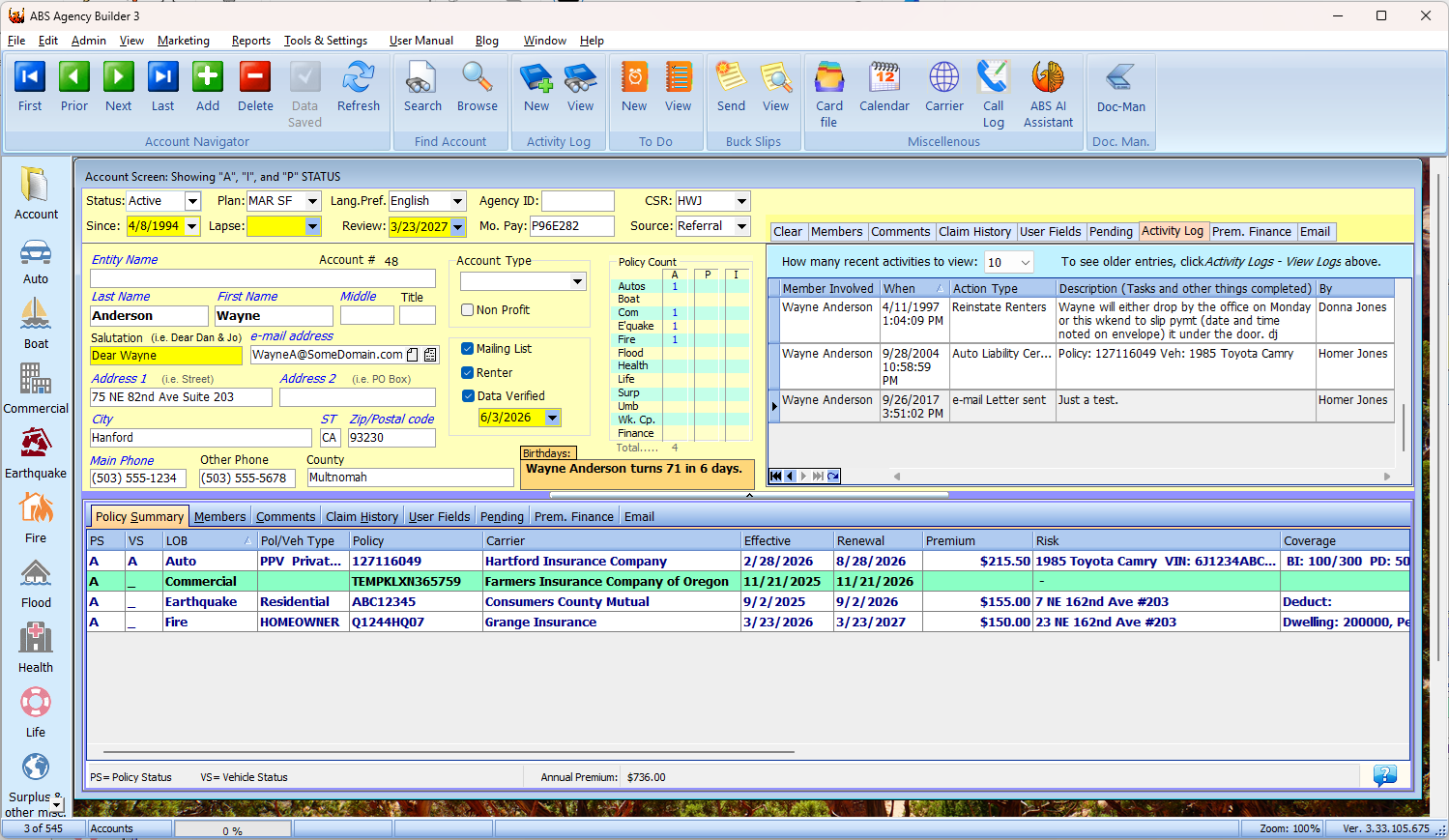
This is a screenshot of the main dashboard of ABS Agency Builder. This single screen shows virtually everything needed to support any circumstance that may arise when contacting a client. There is no need to navigate between multiple screens or applications. It's all right here. If you do need to access more detailed information, you can do so with a simple double-click, or by picking what you need from a dropdown menu. Each section of this screen is discussed in detail below the screenshot.
Centralized Client Information Supports Personal and Business Accounts
Centralized client information is displayed at the top left of the dashboard, providing quick access to essential details about each client. Entity Name allows this information to be used for both personal and business accounts. Very useful for accounts where you insure individuals who also own a business you insure. Everything in one convenient location.
Sales Opportunity Information
To the right of the client information, you'll find sales opportunities in the form of Policy Counts by Line of Business and status (A=Active, I=Inactive, P=Prospect). Empty LOBs are obvious opportunities for additional business, or at least qualification as a prospect. An account with an active fire policy may be a perfect candidate for an Auto or Life policy. Equally important is, an account with multiple policies indicates a high-value client.
Quick-reference details on the Dashboard
Below the client information and sales opportunities, you'll find a row of tabs with more quick-reference details about the client's, family members, policies, recent activity and other relevant information. This allows you to quickly understand the client's history and current status without having to navigate through multiple screens.
The tabs include:
- Policy Summary: A detailed overview of the client's policies.
- Members: Information about the client's family members.
- Comments: Informative notes about the client.
- Claims History: A chronological record of the client's insurance claims.
- User Fields: Customizable fields for additional client information.
- Pending Tasks: A Things-To-Do list for the client including task status for in-progress tasks as well as a history of completed tasks.
- Activity Log: An unalterable record of things done for, with, or about the client. It can be used as a reliable source of information for E&O claims.
- Premium Finance: Information about the client's premium finance accounts.
- Email: The client's saved email history.
- Birthdays: When a member's birthday is approaching, a notification will be displayed. Not a tab, but a helpful feature that tells your client you care. Literally everything you need is at your fingertips.
More Quick-reference Details on the Dashboard
Every Quick-reference tab can be viewed in the upper right portion of the screen if you are lucky enough to have a reasonably wide monitor. This allows you to display twice as much client information without leaving the main dashboard. For example, you may wish to display the Policy Summary information at the bottom of the screen, and Pending Tasks at the top, or any other combination you prefer. This is only one place where ABS Agency Builder can be customized to suit the way you work.
Detailed Policy Information accessible from the Dashboard
The Policy Summary tab shows a summary of the information on the Policy Details pages. That's all you will normally need, but when you do need to access the full details, it's just a double-click away. To access full policy details, double-click the policy in the summary grid. Policy details are also accessible from the LOB list along the left side of the screen. From there, our Carrier Gateway gives you access to the most current policy information directly from the carrier's website.
Why do insurance agencies need a CRM?
- Customer Retention: You worked hard to build a relationship with your client. A CRM helps you maintain that relationship, provide better service, and increase long-term customer loyalty.
- Cross-Selling Opportunities: Our CRM provides insights into client needs and preferences, helping you identify opportunities for additional products and services. Better coverage recommendations strengthen client relationships and increase account value.
- Renewal Management: Renewal time is more than paperwork. It is an opportunity to contact clients, review their coverage, answer questions, and reinforce the value you provide. Consistent communication helps improve retention and reduces the likelihood of clients shopping elsewhere.
- Service History: Detailed records of client interactions help resolve misunderstandings, document services provided, and demonstrate your commitment to customer satisfaction. Comprehensive records can also provide valuable support in E&O situations.
- Relationship Building: Remembering important dates, following up on previous conversations, and understanding client needs all contribute to stronger long-term relationships and improved customer satisfaction.